
Store screenshots generated from the actual extension experience.
Autofill that feels invisible
Forms should feel effortless, not repetitive.
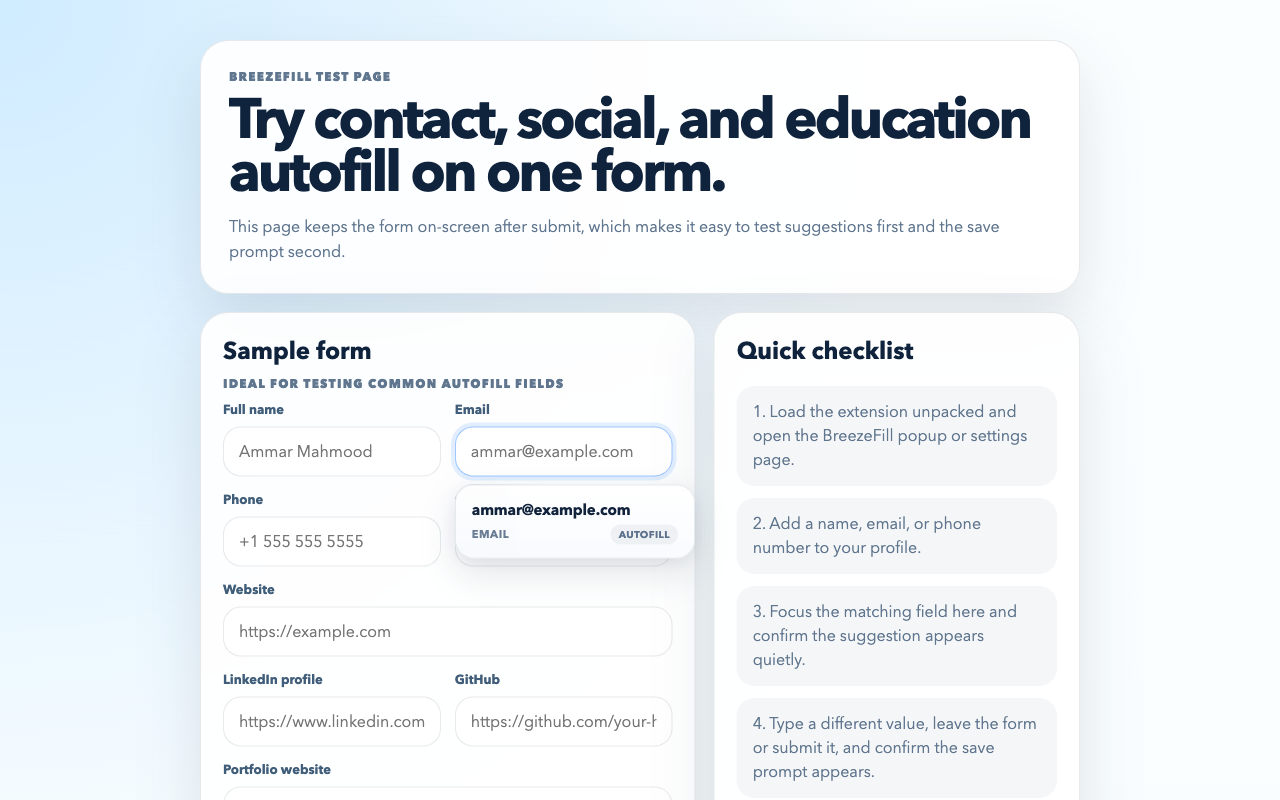
BreezeFill quietly suggests your name, email, phone, links, and education details right when a form asks for them. When you type something new, it can remember it next time only if you want it to.
Chrome can be loaded unpacked from the repo today, and Safari on Mac now has a notarized app download too.
Local browser storage
Quiet save prompts
Works on job applications
Autofill
Shows only the most likely suggestion.
Save only when asked
No surprise memory. No noisy dropdowns.
Application platform adapters ready for job and internship forms.
End-to-end browser tests covering suggestions, saves, and ATS markup.
See it in action
A clean place for the real BreezeFill walkthrough.
Show the exact moment BreezeFill recognizes a field, suggests the right detail, and asks to save a new answer without taking over the page.
Coming soon
Recognize
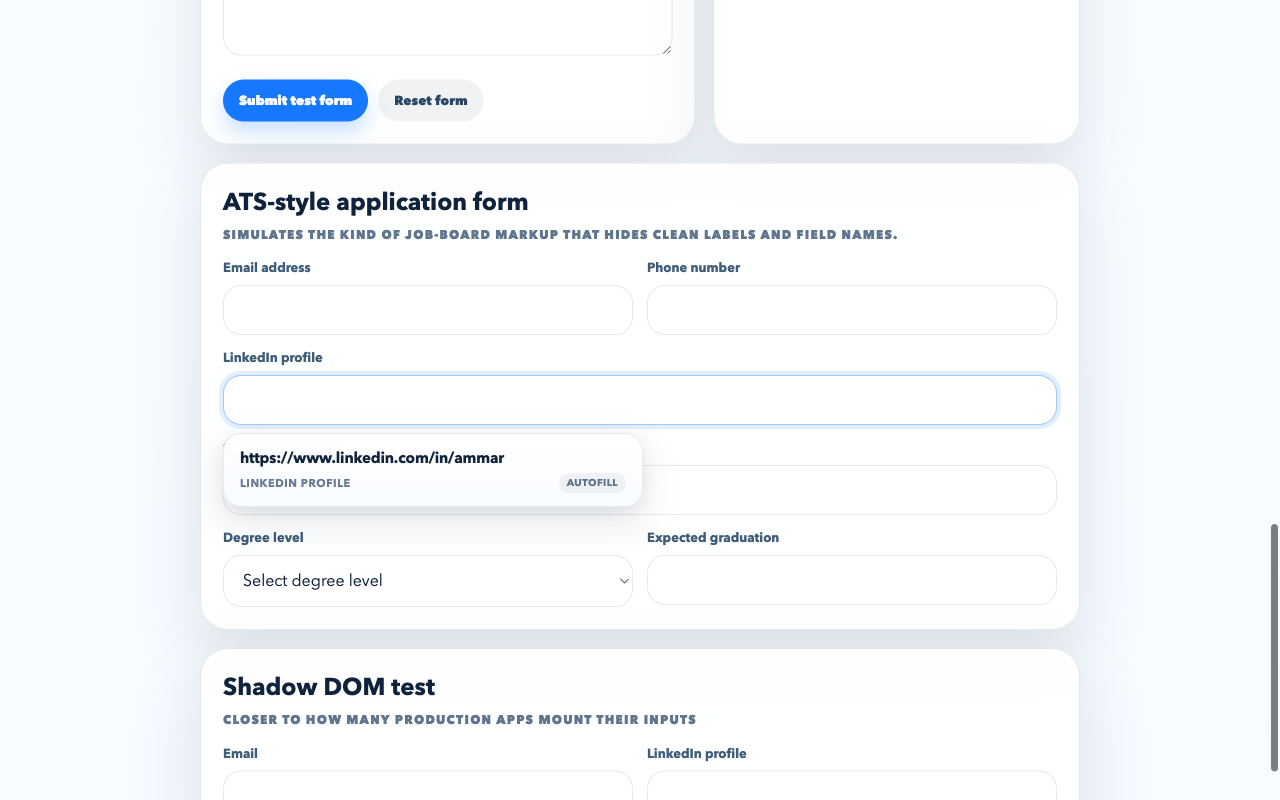
Email, phone, links, and education fields map automatically.
Suggest
The UI stays compact so it feels closer to a native hint than a popup.
Remember
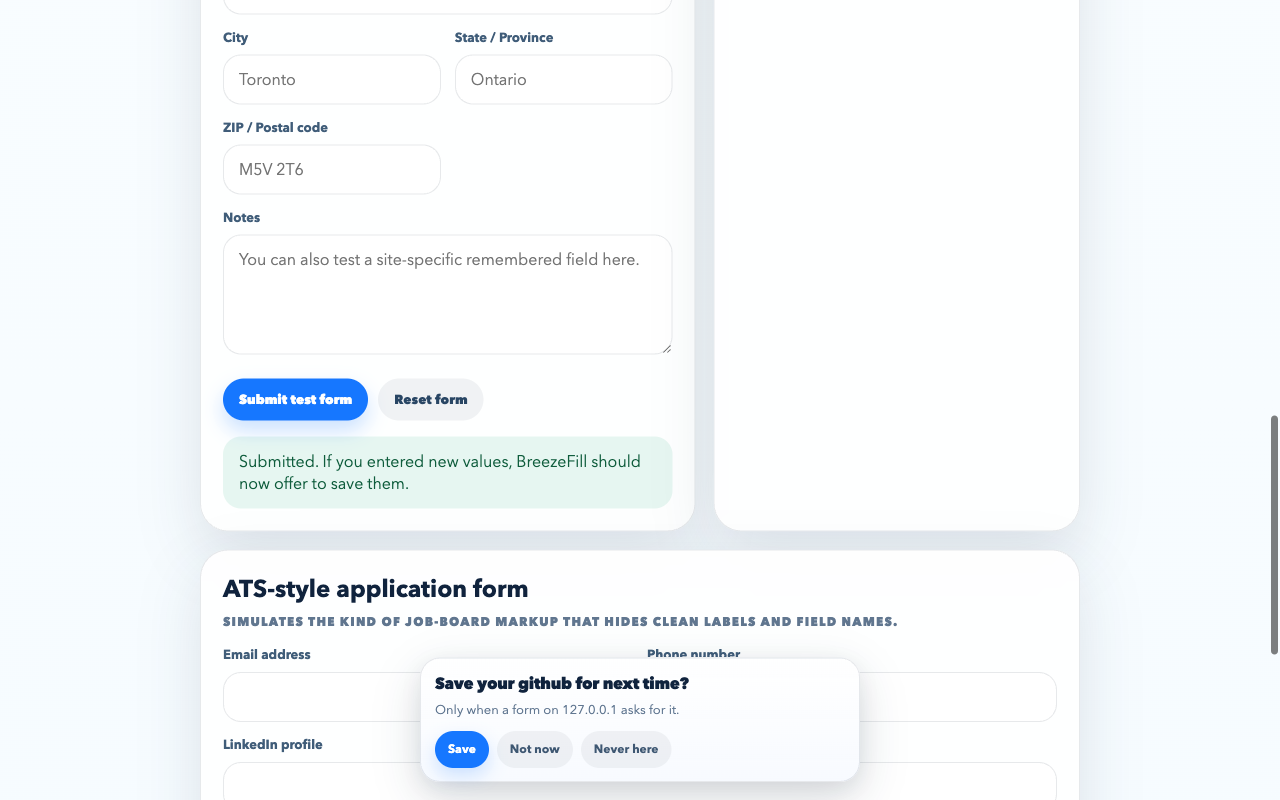
New responses only get saved when the user actually says yes.
Built to show the whole flow in one calm clip.
This section is ready for a short product demo that covers profile setup, autofill suggestions, and the save prompt on a real form.
Built for real forms
Not just a demo dropdown on a clean page.
BreezeFill is designed for the places people actually lose time: internship applications, profile setup, and the endless repeat of contact details.
Internships, jobs, and scholarship forms
LinkedIn, GitHub, portfolio, school, degree, program, graduation, and all the little details that show up again and again.
Signup, onboarding, and profile setup
Fill the obvious fields instantly without turning the whole page into a noisy extension experience.
Lead forms, newsletters, and event pages
Quick autofill where the friction should be close to zero, plus save prompts that wait until you’re actually done.
Why it feels better
The point is to disappear into your flow.
BreezeFill is built to feel more like a native convenience than a browser tool yelling for attention.
Quiet suggestions
Common fields like email, phone, name, LinkedIn, and school surface a compact, calm suggestion instead of a giant menu.
Save only with consent
New values are offered back to you after the form interaction, not captured invisibly while you type.
Modern form support
Works across iframes, open shadow DOM, native selects, and a growing adapter layer for real job application platforms.
Local by default
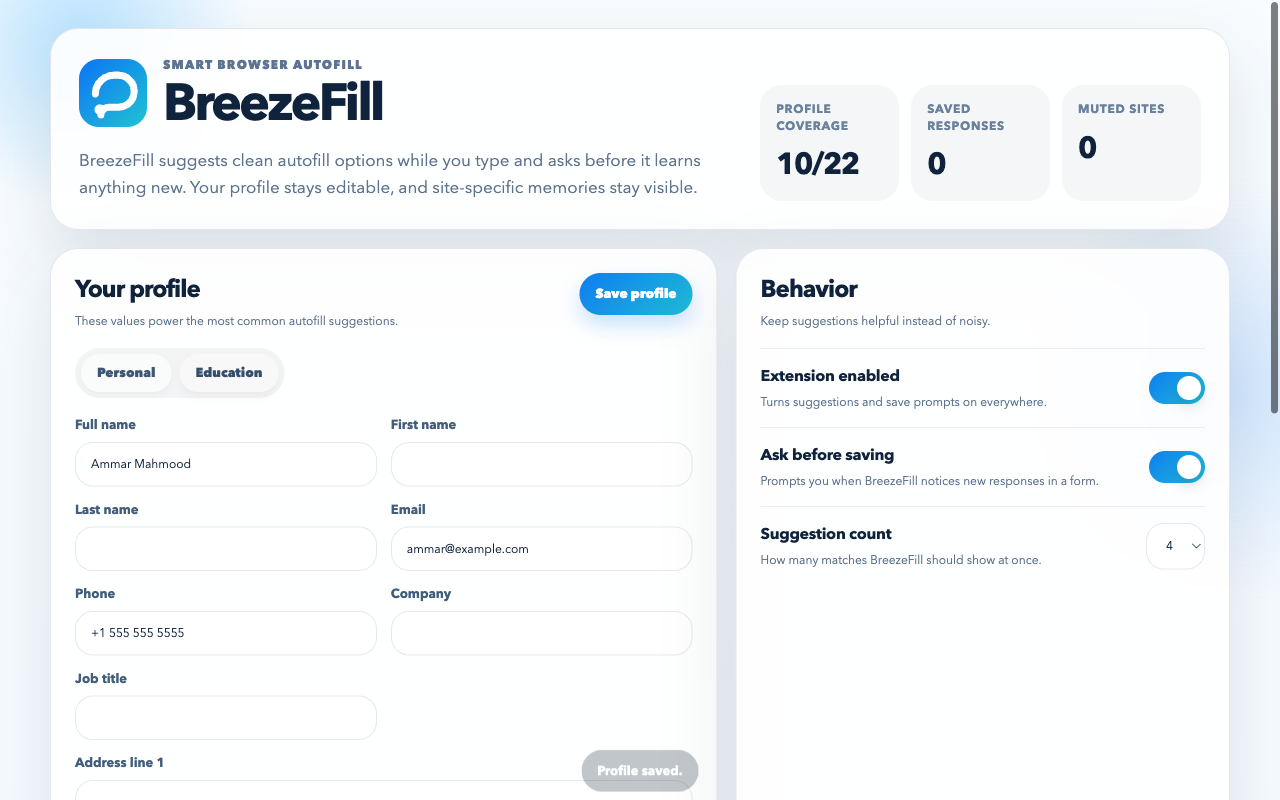
Profile values, remembered responses, and muted sites stay inside browser extension storage instead of being pushed to a BreezeFill backend.
Flow, not friction
A product rhythm that stays out of the way.
Recognize the field
Email, phone, links, education, and common application questions map automatically.
Suggest one likely answer
The UI stays small and calm so it feels closer to a native hint than a popover.
Ask before remembering
New values get offered back to you after the interaction, not silently harvested mid-form.
What it looks like
The real extension, not mockups.
Install in minutes
Download the Chrome ZIP or grab the Safari Mac app.
BreezeFill is live today as a Chrome ZIP download and a notarized Safari Mac app. The Chrome Web Store path is already planned into the page and can switch on the moment the listing exists.
- Download the repo ZIP from GitHub.
- Unzip it anywhere on your machine.
- Open `chrome://extensions` in Chrome.
- Turn on `Developer mode` in the top right.
- Click `Load unpacked` and choose the unzipped BreezeFill folder.
- Open the extension settings, add your profile, and you’re ready.
- Download the notarized Safari Mac app.
- Unzip the download if your browser saves it as a ZIP archive.
- Drag
BreezeFill.appintoApplications. - Open
BreezeFillonce fromApplications. - Open
Safari→Settings→Extensions. - Turn on
BreezeFilland allow website access if Safari asks. - Open a normal form in Safari and BreezeFill is ready.
Direct download:
breezefill.vercel.app/assets/downloads/BreezeFill-macOS.zip
Safari tip:
Safari → Safari Extensions… opens the
App Store. To enable BreezeFill, use Safari → Settings → Extensions.
Coming soon
Chrome Web Store release is not live yet.
For now, the smoothest path is the Chrome ZIP download above. As soon as the listing is approved, this tab and the main install button can switch over.
For now: use the Chrome ZIP in about a minute, then move
to the store when it goes live.
- Open the Chrome Web Store listing.
- Click `Add to Chrome`.
- Pin BreezeFill if you want fast access to the popup.
- Open BreezeFill, add your details, and start using it immediately.
Live now: once the store URL is added in
docs/app.js,
this panel becomes the default install path automatically.
- Clone the repo:
git clone https://github.com/ammarjmahmood/breezefill.git - Open the project folder. There is no build step required to install the extension.
- Optional: run
npm installif you want the test tooling. - Optional: run
npm run test:e2eto verify the extension locally. - Open `chrome://extensions`, turn on `Developer mode`, and click `Load unpacked`.
Support BreezeFill
Make room for donations without making the page feel salesy.
If BreezeFill saves people real time, this section is ready for a simple support link. Until that is live, the page can be honest about it and still feel intentional.
Donation link coming soon. For now, starring the repo is the easiest way to help.
Ship it well
Built for a clean Product Hunt launch path too.
The repo already includes Chrome packaging, store screenshots, promo art, review notes, and a privacy policy. Pair this launch site with the Chrome Web Store listing and you have a much stronger public launch surface.
Launch ready
A cleaner funnel for Product Hunt and early users.
This site is set up so you can point people to one polished homepage, one hosted privacy page, and one obvious install path. Swap in the Chrome Web Store URL when it goes live and the site becomes your real launch destination.
For Vercel
Root URL, assets, and `/privacy` are already wired.
For Product Hunt
Use the homepage as the launch URL and the screenshots as your gallery.
FAQ
Things people usually want to know first.
Does BreezeFill send my saved form data to a server?
No. The current build stores profile values, remembered responses, and muted-site settings locally in browser extension storage.
Can it work on job application websites?
Yes. BreezeFill includes a shared adapter layer for major application platforms and broader matching for the weird field names those sites often use.
Do I need to run a build command before loading it into Chrome?
No. For install, you only need the repo contents. npm install is
only for tests, screenshots, and packaging scripts.
How do I turn it on in Safari after downloading the Mac app?
Open the exported BreezeFill.app once, then go to
Safari → Settings → Extensions and enable BreezeFill there.
The Safari → Safari Extensions… menu opens the App Store, not your
installed app extensions.
What should I use for the Chrome Web Store privacy-policy URL?
Deploy this site on Vercel and use the hosted /privacy/ page
as the public policy URL.